Showing posts with label WEB API. Show all posts

Friday, 10 March 2017

Types of Grant Workflows

Resource Owner Password Grant

The User Credential are stored at client and sent to the token service which returns the token. Collecting and storing credential is the job of the token service doing it in client is consider not safe.The User Credential are stored at client and sent to the token service which returns the token. Collecting and storing credential is the job of the token service doing it in client is consider not safe.

This grant is only used in legacy scenario.

Implicit Grant

Implicit flow is commonly user when a client is javascript application a browser.

Here browser issue for Token to Token Service without explicitly providing client credential then a redirection occurs to a login page that is served by Token Service.

This approaches often has a security issue

Authorization Code

Authorization Code solves the security problem. It needs a web server Application i.e. the client.

Hear browser get a code back from Token Service and that browser send that code to Client(Web Server) Then client sends the code to Token Service and get the Token back.

Hybrid

Tuesday, 3 May 2016

(Part 1 of 2) How to Create Simple Windows Service and Log with Log4Net

Our windows service will support two modes

  1. Interval Mode Executes a task at regular intervals after some delay
  2. Daly Mode Executes a task at specific time of day

Create New Windows Service Project and Add aap.config file

Add Reference (system.configuration)

Code Your Service

Adding an Installer to the Windows Service and Write Code

Setting the Windows Service Name and StartType

Making the Windows Service Automatically start after Installation

Compile and Install Service

Test Our Window Service

Get Source Code GitHub

Monday, 2 May 2016

Three Moral Code for Designing WEB API (Security, Stability, Documentation)

Security

There are many methods to Secure your api but two are most widely used. Token-based authentication and OAuth 2 + SSL

Token-based authentication

For most APIs, I prefer a simple token-based authentication, where the token is a random hash assigned to the user and they can reset it at any point if it has been stolen. Allow the token to be passed in through POST or an HTTP header.

OAuth 2 + SSL

Another very good option is OAuth 2 + SSL. You should be using SSL anyway, but OAuth 2 is reasonably simple to implement on the server side, and libraries are available for many common programming languages.

Here are some other important things to keep in mind:

  • Whitelisting Functionality. APIs generally allow you to do basic create, read, update, and delete operations on data. But you don’t want to allow these operations for every entity, so make sure each has a whitelist of allowable actions. Make sure, for example, that only authorized users can run commands like /user/delete/{id}. If it doesn’t, then send back an error message such as a 406 Not Acceptable response.
  • Protect yourself against Cross-Site Request Forgery (CSRF). If you are allowing session or cookie authentication, you need to make sure that you’re protecting yourself from CSRF attacks.
  • Validate access to resources. In every request, you need to verify that a user is in fact allowed access to the specific item they are referencing.

Stability and Consistency

Let's say you have a api http://niisar.com/api/friendlist and it response JSON Data. This seems fine at first. But what happen when you need to modify the format of JSON? Everyone that’s already integrated with you is going to break. Oops.

So do some planning ahead, and version your API from the outset, explicitly incorporating a version number into the URL like http://niisar.com/api/v1/friendlistso that people rely on v1 of API.

Also use inheritance or a shared architecture to reuse the same naming conventions and data handling consistently throughout your API.

Finally, you need to record and publish a changelog to show differences between versions of your API so that users know exactly how to upgrade.

Documentation and Support

Documentation may be boring but if you want anyone to use your API, documentation is essential. You’ve simply got to get this right. It’s the first thing users will see, so in some ways it’s like the gift wrap. Present well, and people are more likely to use your API.

Fortunately, there are number of software tools that facilitate and simplify the task of generating documentation. Or you can write something yourself for your API

But what separates great documentation from adequate documentation is the inclusion of usage examples and, ideally, tutorials. This is what helps the user understand your API and where to start. It orients them and helps them load your API into their brain.

Make sure that API can get up and running with at least a basic implementation of your API, even if it’s just following a tutorial, within a few minutes. I think 15 minutes is a good goal.

Some specific recommendations to ease and facilitate adoption of your API:

  • Make sure people can actually use your API and that it works the first time, every time.
  • Keep it simple. so that developers only have to learn your API, not your API + 10 obscure new technologies.
  • Provide language-specific libraries to interface with your service.
  • Simplify any necessary signup.
  • Provide excellent support. A big barrier to adoption is lack of support. How will you handle and respond to a bug report? What about unclear documentation? An unsophisticated user? Forums, bug trackers, and email support are fantastic starts, but do make sure that when someone posts a bug, you really address it. Nobody wants to see a ghost town forum or a giant list of bugs that haven’t been addressed

Saturday, 30 April 2016

Integrating Fluent Validation in Web API using Autofac

Create New Project

Install Necessary Packages

  Install-Package Autofac
  Install-Package Autofac.WebApi2
  Install-Package FluentValidation
  Install-Package FluentValidation.WebApi
  Install-Package Microsoft.AspNet.WebApi
  Install-Package Microsoft.AspNet.WebApi.Owin
  Install-Package Microsoft.Owin.Host.SystemWeb
  Install-Package Owin
  Install-Package Newtonsoft.Json
 

Create Partial Startup Classes

Partial class is just splitting class file into two or more files, and all parts are combined when the application is compiled.

It is used in a situation

  • When working on large projects, spreading a class over separate files enables multiple programmers to work on it at the same time.
  • When working with automatically generated source, code can be added to the class without having to recreate the source file. Visual Studio uses this approach when it creates Windows Forms, Web service wrapper code, and so on. You can create code that uses these classes without having to modify the file created by Visual Studio.
  • To split a class definition, use the partial keyword modifier

While adding this class our project structure looks like.

Startup.Autofac.cs

Startup.WebApi.cs

Startup.cs

Add Infrastructure classes

Now our Project structure looks like

AutofacValidatorFactory.cs

AutofacWebModule.cs

ValidateFilterAttribute.cs

Add Modal Validation and Controller

Now our Project structure looks like

Controller

Model and Model Validation

Finally test our code


Thanks,


Download Code

Friday, 22 April 2016

Easy and Smart Modal Validation in Web API 2.0


Today i have written a custom ValidateFilterAttribute that will eliminate some unnessary code in API Controller and save our developing time too. We will simply try to handle all validation from one common piece of code rather then writting every single validation in a controller.
I have used OnActionExecuting(HttpActionContext actionExecutingContext) as this allows me to remove the boilerplate if (!ModelState.IsValid) return from the methods.

Friday, 12 February 2016

Token Based Authentication using Web Api 2, OWIN, Identity, AngularJS, RequireJS

So first lets us know what those technology are and why to use those specific technology for Authentication.

ASP.NET Web API is a framework that makes it easy to build HTTP services that reach a broad range of clients, including browsers and mobile devices. ASP.NET Web API is an ideal platform for building RESTful applications on the .NET Framework.

OWIN stands for Open Web Interface for .NET. It defines a standard interface between .NET web servers and web applications. Point to Note.. It is not a framework or tecnology.. It's just a Specification.

Identity The ASP.NET Identity system is designed to replace the previous ASP.NET Membership and Simple Membership systems. It includes profile support, OAuth Integration, works with OWIN, and is included with the ASP.NET templates whipped with VS 2013.

AngularJS is most popular SPA framework. It is most widely used SPA framework developed and maintained by Google.

RequireJS is actually a fork of the Common.js specification. It is most popular AMD(Asynchronous Module Definitions) which is designed to load modular code asynchronously in the browser. This way it makes you app load faster and javascript file more managable.

Now you might got an basic idea of each technology. What they do and How they do. Lets start working with those...

Create Project and Package

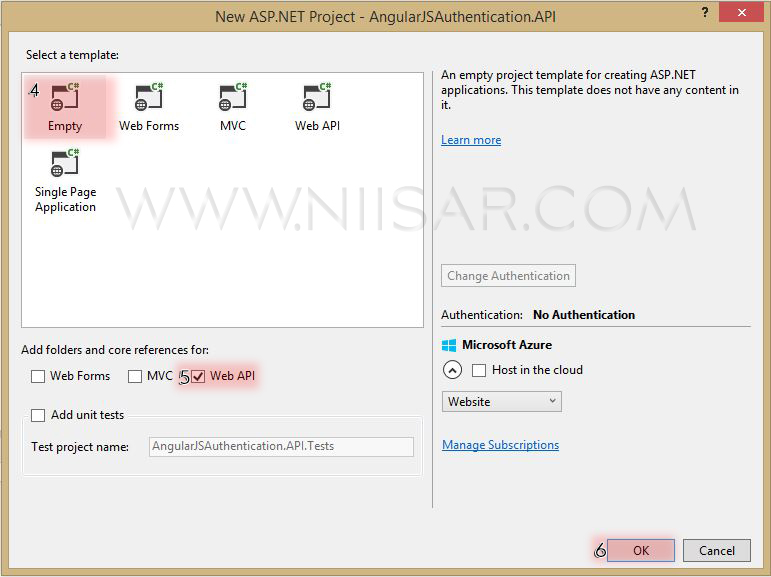
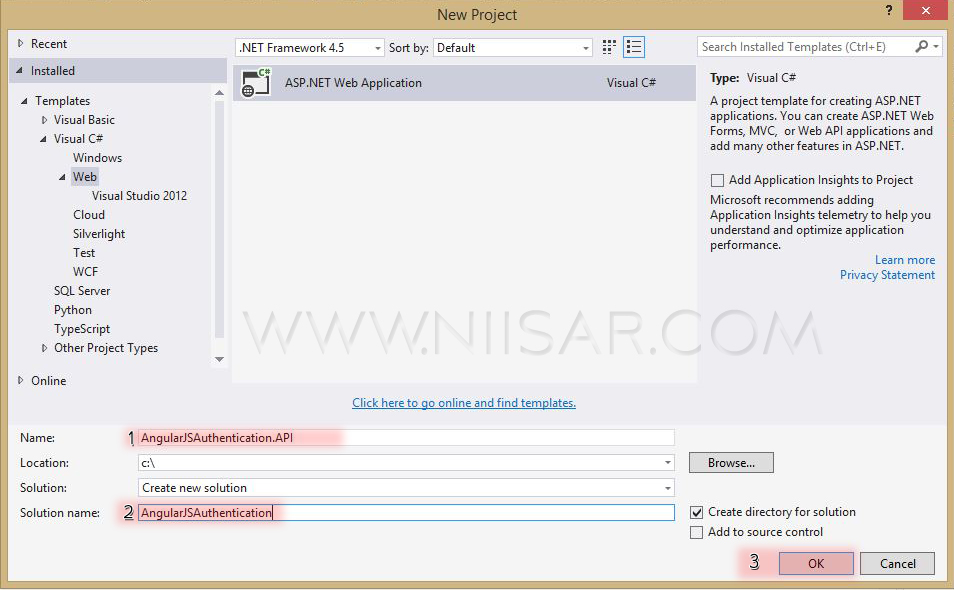
Create New ASP.NET Web Application
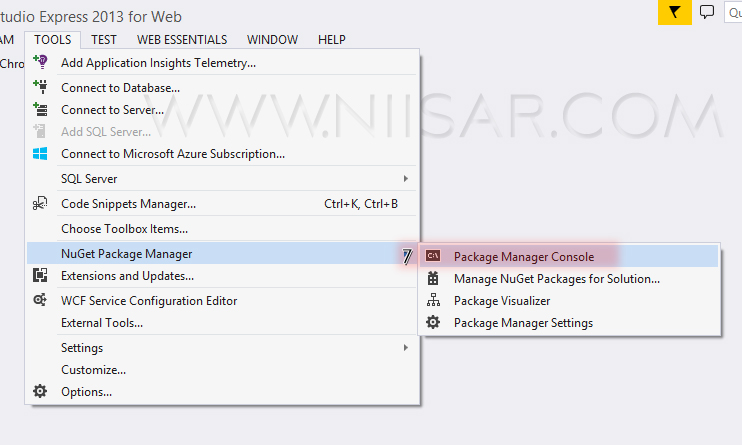
Open Package manager console and add few packages.
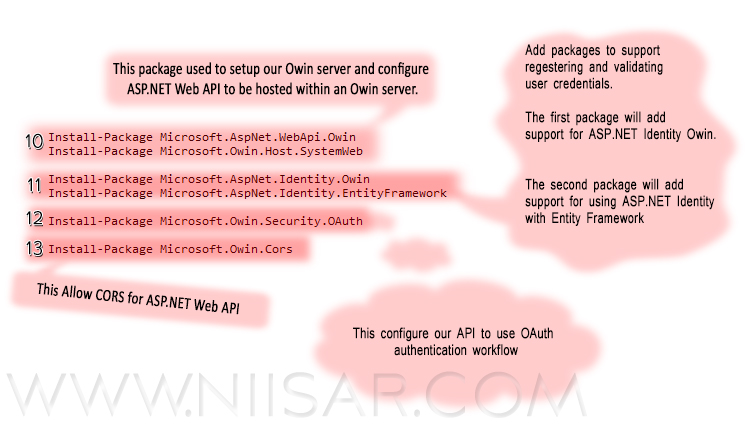
 Install-Package Microsoft.AspNet.WebApi.Owin
 Install-Package Microsoft.Owin.Host.SystemWeb

 Install-Package Microsoft.AspNet.Identity.Owin
 Install-Package Microsoft.AspNet.Identity.EntityFramework

 Install-Package Microsoft.Owin.Security.OAuth

 Install-Package Microsoft.Owin.Cors
Delete Global.asax as we no need to use this class and fire up the Application_Start event and our "Startup" class so feel free to delete it.
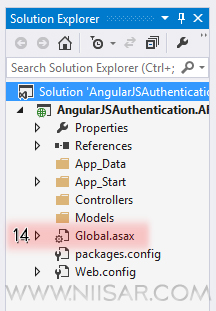
Add New Classes and Folder as show in image below.
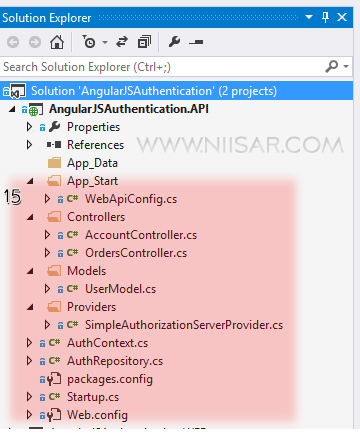


Now Let's do few coding things. All code is well documented that you can understand it very easily

Add Connection String to Web.config

Startup.cs

AuthContext.cs

AuthRepository.cs

Providers > SimpleAuthorizationServerProvider.cs

Models > UserModel.cs

Controllers > AccountController.cs

Controllers > OrdersController.cs

App_Start > WebApiConfig.cs

Now we are done with API. Lets Start Testing it.. We will use Post Man tool to test our api.

Register
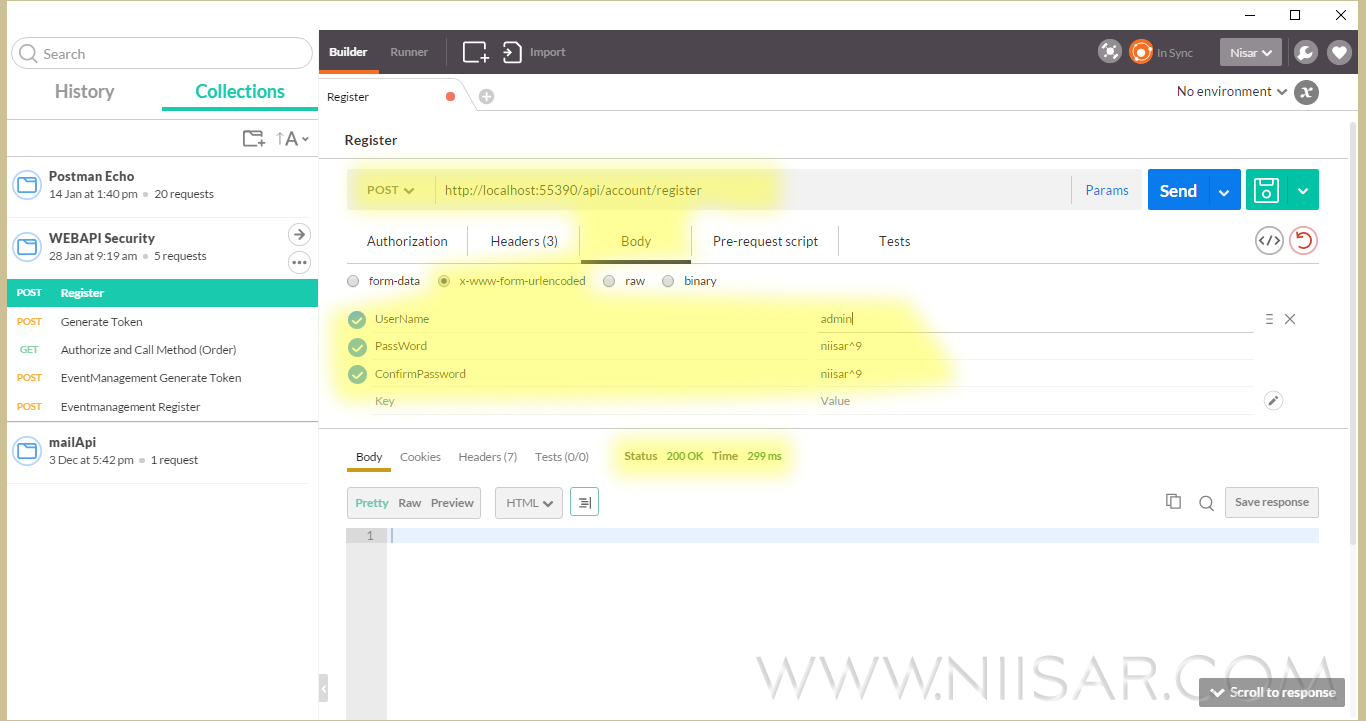
Check if user created in SQL Server Database
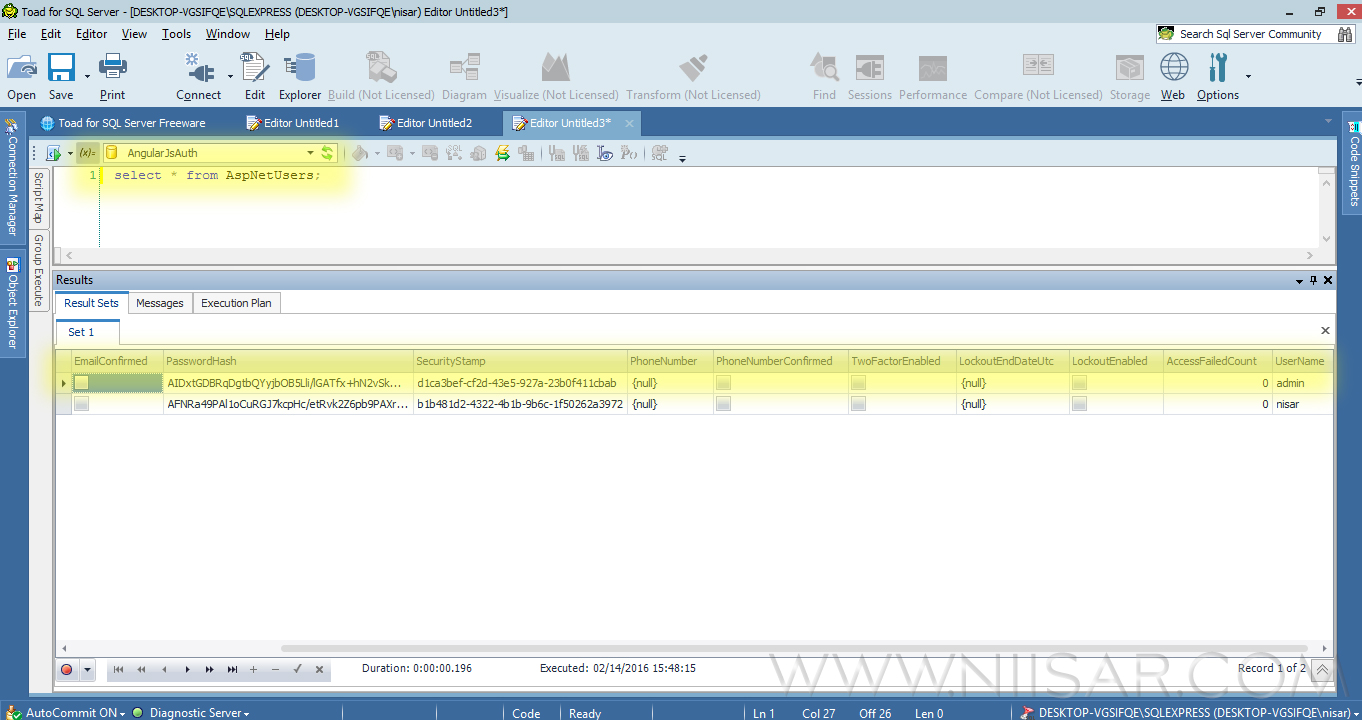
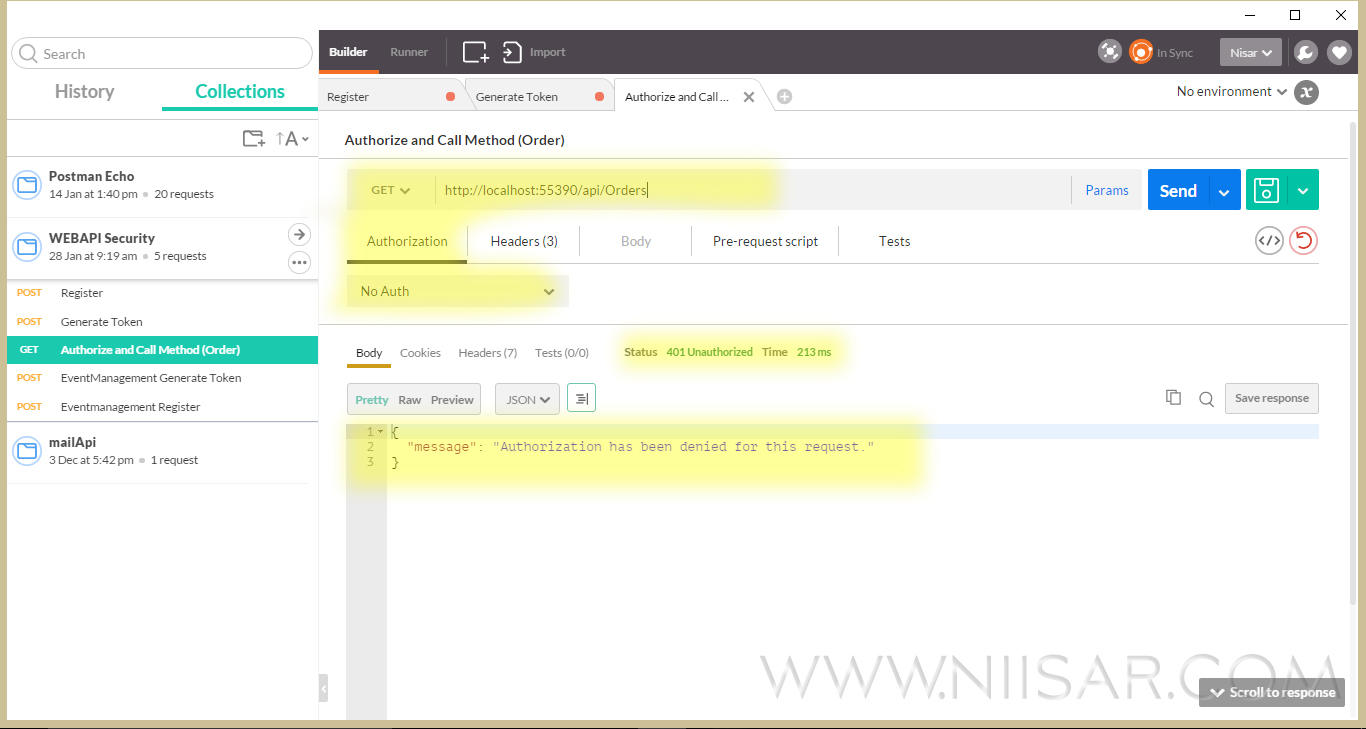
Get list of order without an Authorization
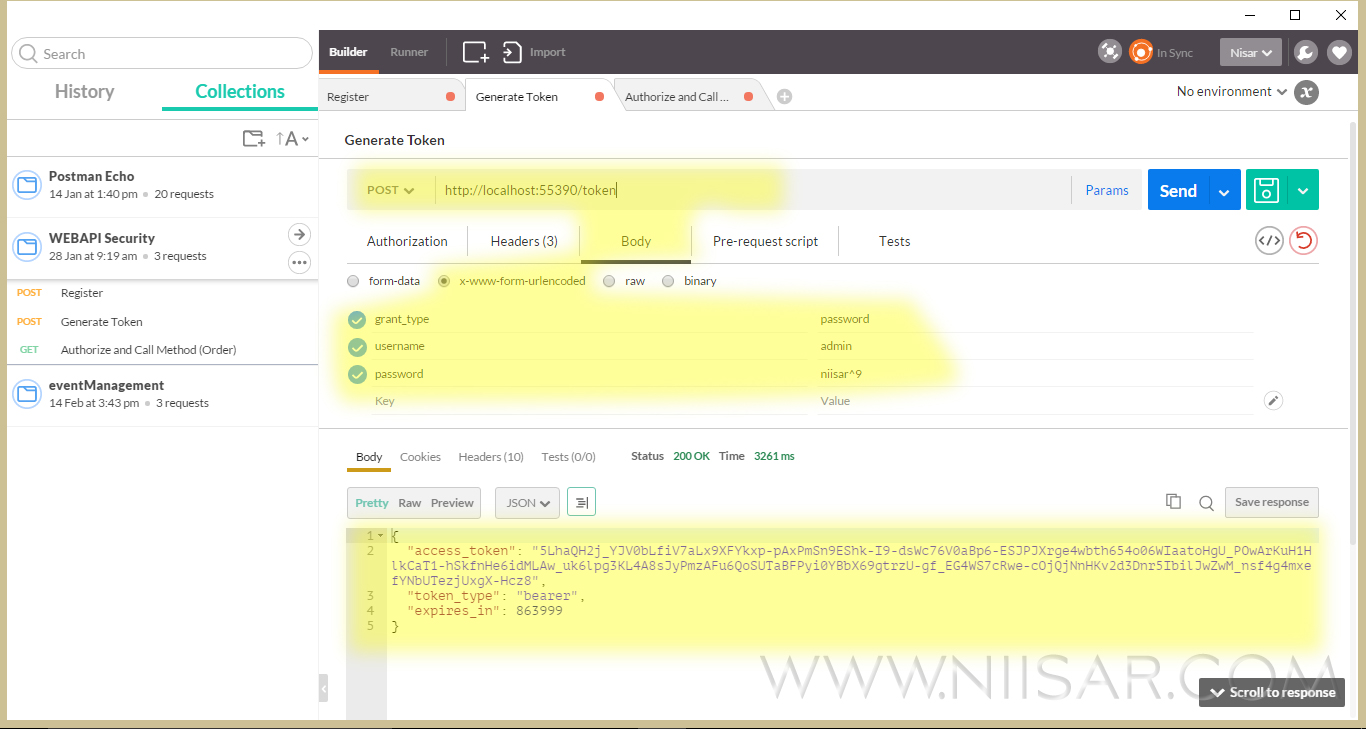
Generate a token
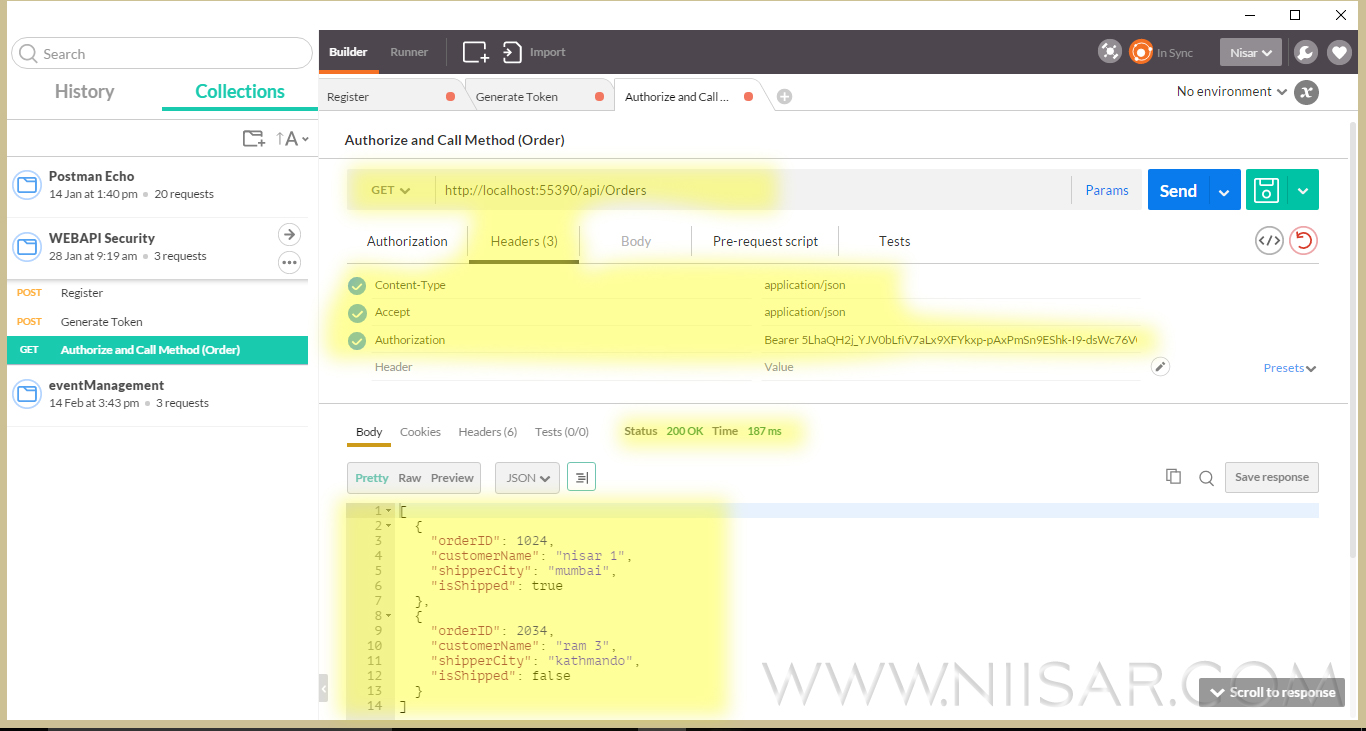
Get list of order with an Authorization
Well now we are good after testing Registering User, Generating Token, and Consuming Resource by authentication ID and Password we will write The Client Program by using AngularJS and RequireJS.

Add Project AngularJSAuthentication.WEB to the same solution and the file structure as below
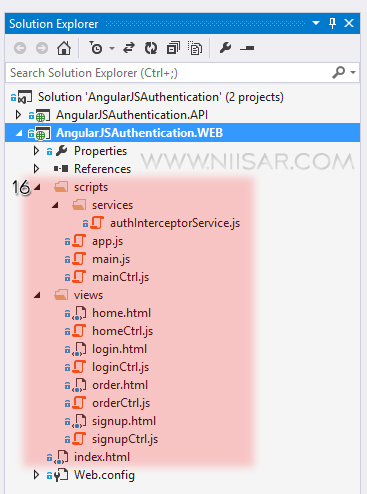


And code it as below... The code is self descriptive

index.html

scripts > app.js

scripts > main.js

scripts > mainCtrl.js

scripts > services > authInterceptorService.js

Interceptor is regular service (factory) which allow us to capture every XHR request and manipulate it before sending it to the back-end API or after receiving the response from the API, in our case we are interested to capture each request before sending it so we can set the bearer token, as well we are interested in checking if the response from back-end API contains errors which means we need to check the error code returned so if its 401 then we redirect the user to the log-in page.

views > home.html

views > homeCtrl.js

views > login.html

views > loginCtrl.js

views > order.html

views > orderCtrl.js

views > signup.html

views > signupCtrl.js

Now let us test it.

Hope it helped you to understand the core concept of security in WEB API and how to use it in Angular.

You can download whole work from my GIT

Thanks for reading. ツ